The
Use
Click here to download! *clicking redirects to driveweb.com*
drive.web
environment incorporates thesavvy
suite of software tools and utilities that will all run on a wide variety of operating systems including Windows, Mac OS X, Unix, Linux, and Solaris platforms. Thedrive.web savvy tools
are all automatically updated online.Use
savvy
"phantoms" to create systems which can be downloaded later into the real devices.savvy
can be downloaded free of charge from driveweb.com and provides powerful navigation features including pan, zoom, jump to, drill down, and browse.Click here to download! *clicking redirects to driveweb.com*
savvy Features
- Online or offline design of drive systems using intuitive tools with pre-engineered function blocks.
- Internet access to drives and systems for remote configuration, monitoring and process training.
- Provides easy import, export and cloning of device configurations.
- Dynamic graphics show real time state of switches, indicators, parameter values, etc.
- Low cost full featured Distributed Control capability with peer-to-peer networking.
- Multiple users, local or remote, can have concurrent real-time access to drives or systems.
- Function Block Libraries for winder controls, PID, drive synchronization, arithmetic, logic, etc.
- Deterministic connections provide high performance links between drives, PLCs, Operator Stations, SCADA computers and other control products.
- "drag & drop" techniques make easy parameter connections between drives, control devices, etc.
- "Dock" feature enables key system parameters to be monitored and trended from one location
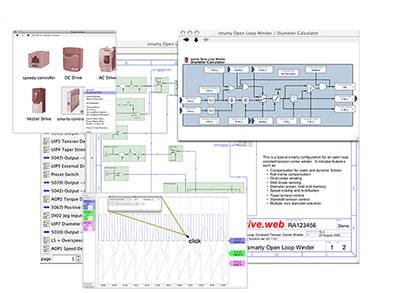
- Powerful Navigation features include drill down (into detail layers in drives and controllers), search, connection tags, jump, browse, pan and zoom for easy visual system comprehension
- VPN (Virtual Private Networking) for secure Internet connectivity is supported.
- Password protection is provided for savvy software, speedy and smarty devices.
savvy Programming
The
savvy
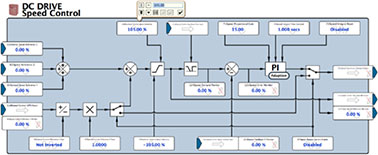
function blocks are full featured application processors that include all of the attributes you need for professional systems solutions. Blocks incorporate all of the features such as scaling, ranging, signal inversion, hysteresis, etc. that are essential to reliable, high performance processing. The following examples are typical ofsavvy
:Engineering Info
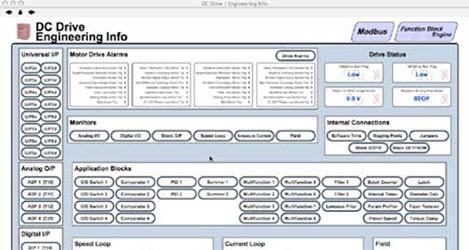
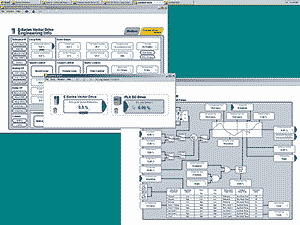
In complex products with a fixed set of features, such as drives, an Engineering Info window gives an organized overview of the key parameters, i/o and control features.
Graphical Function Blocks
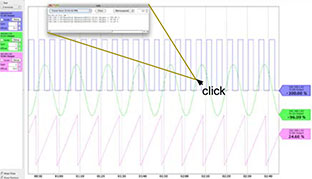
Trend Charting
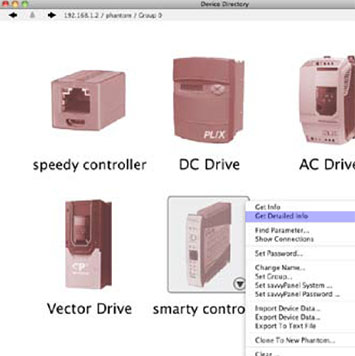
Information at your fingertips
Graphical Programming
savvy-SFD...Signal Flow Diagram
The savvy-SFD option provides a powerful, graphical, Signal Flow Diagram interface with enhanced system wide navigation and the ability to produce clear, annotated, device and system documentation.
savvy-SFD Features
- Basic savvyPanel operator station functions included.
- Create your own customized drawing sheets with choice of ISO or ANSI formats.
- Signal flow diagrams provide a clear vision of your control scheme and its functionality.
- Tags clearly specify the source, destination and location of connections between multiple pages.
- Entire drawing is stored in the drive.web devices for instant access in the field.
- Key parameters can be shown at the Signal Flow Diagram level for enhanced monitoring and control.
- Connections are “rubber-banded” so function blocks can be moved on pages or between pages.
- “Drag & drop” connections can be made between any parameter anywhere in a system.
- Drawings can be user annotated.
- Powerful navigation features ensure fast searches and guarantee that you will never get lost.
- Password protection is provided at many levels for secure use.
savvy Programming
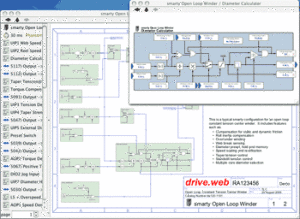
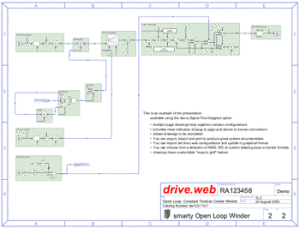
To the right are the first two pages of a typical open loop constant tension center winder configuration in a smarty.
- Clicking on a function block in the Signal Flow Diagram drills you down into the details and shows parameter values and status.
- Function blocks and connections are shown in a list that can be sorted and filtered to show objects with common attributes or states.
- The lower page shows how function blocks can be organized in a logical signal flow manner that makes system design and user comprehension very easy.
- The entire drawing data is stored in the drive.web smarty or speedy and can be accessed at any time without the need for externally stored configuration files.
- savvy-SFD automatically produces top quality documentation as you design, configure and build your system.
Try the savvy-SFD demo
Open the “File” menu in the basic savvy, select “Demo Mode”, check the “Graphical Configurator” box and follow the “Getting started with savvy-SFD” guide in the “Help” menu.
Obtaining & Installing the savvy-SFD Option
Go to the Get savvy page and follow the instructions to download the version of the basic savvy software you need for your computer operating system. ***Note: Clicking this link redirects to driveweb.com***
With your computer connected to the Internet, start the drive.web savvy program and either use an Option Coupon, which you can obtain from your distributor, or process a credit card transaction.
The savvy program incorporates several very useful documents in the “Help” menu that introduce you to the basics, guide you through the details and help you plan, implement and document your system designs.
savvy Training
savvy is a very powerful drive, systems design and configuration tool. We offer both introductory and advanced training courses that will help you get the most out of your projects. For details, please call us at (410) 604-3400.